How to Filter and Prioritize Emails Using an AI Agent and Send Notifications to Telegram/WhatsApp

The Problem
The average professional receives over 120 emails per day. Most of them are promotions, newsletters, automated notifications, and spam. Buried somewhere in that pile are the messages that actually matter — a client waiting for a response, a team member flagging an urgent issue, a deal that needs attention right now.
Studies show it takes roughly 23 minutes to refocus after switching tasks. Every time you open your inbox to scan for something important, you lose time and mental energy — even if nothing urgent was there.
What if an AI agent could do the scanning for you, sort everything by priority, throw out the noise, and send you a clean digest straight to your Telegram group or WhatsApp chat — automatically, every morning?
With Younet, you can set this up in under 15 minutes. No code. No complex integrations. Just plain-language instructions to an AI agent that works on your behalf.
What You Will Need
- A Younet account (free or paid)
- A Gmail, Outlook, or SMTP email account
- A Telegram account (or WhatsApp)
- About 10 to 15 minutes
Step-by-Step Setup
Step 1: Create or Select Your AI Agent
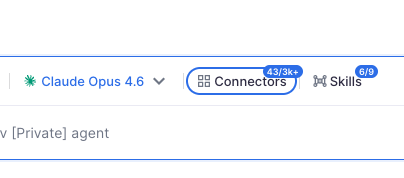
Log into Younet and either create a new AI agent or use one you have already set up. Navigate to the Connectors section of your agent. This is where you activate the tools your agent will use.
Step 2: Activate the Messenger Connector
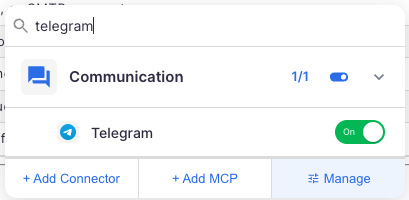
In the Connectors panel, find and activate your preferred messenger — Telegram Bot or WhatsApp. For this guide, we will walk through the Telegram setup.
Click on the Telegram Bot connector and follow the on-screen instructions. You will be guided through creating a bot via Telegram's @BotFather. This process takes about two minutes and gives your AI agent a presence inside Telegram.
Step 3: Create a Telegram Group
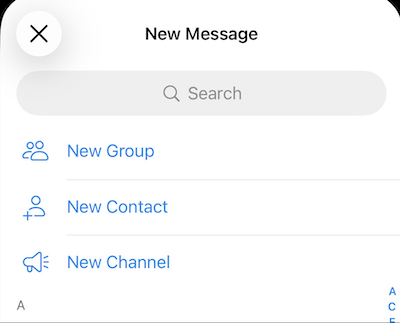
Open Telegram and create a new group. Name it something clear and recognizable — for example, “Email Digest” or “Priority Inbox.”
This group is where your AI agent will post your sorted email summaries.
Step 4: Add Your Bot to the Group
Once the group is created, add the bot you just set up as a member of the group. This allows the AI agent to send messages into the group on your behalf.
Step 5: Activate the Email Connector
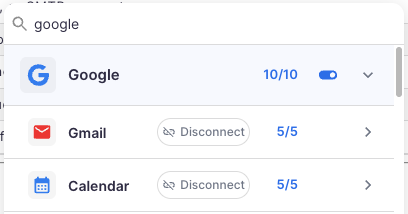
Go back to the Connectors panel in Younet and activate your preferred email connector:
- Gmail — connects via Google OAuth
- Outlook — connects via Microsoft OAuth
- SMTP — for custom or self-hosted email servers
Follow the authentication steps. Once connected, your AI agent will have read access to your inbox.
Step 6: Test the Setup Manually
Before automating anything, run a manual test. Go to the Playground (chat interface) for your agent and type something like:
“Check my latest emails. Sort them by priority — most important first, least important last. Exclude all promotional emails, newsletters, and spam. Then send the sorted list to my Telegram group called Email Digest.”

The agent will scan your inbox, apply its judgment to categorize and rank the emails, filter out the noise, and post a clean summary to your Telegram group.
Open Telegram and check the group. You should see a prioritized digest of your emails.
Step 7: Review and Refine
Review what the agent sent. If you want adjustments — for example, “always flag emails from my boss as top priority” or “ignore anything from noreply addresses” — simply tell the agent in plain language. It will adapt.
This is the beauty of working with an AI agent rather than a rigid rule-based filter. You communicate in natural language, and the agent understands context.
Step 8: Automate with TasksCloud
Now that the manual test works, it is time to automate the process.
Navigate to TasksCloud in Younet.
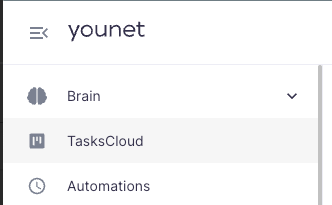
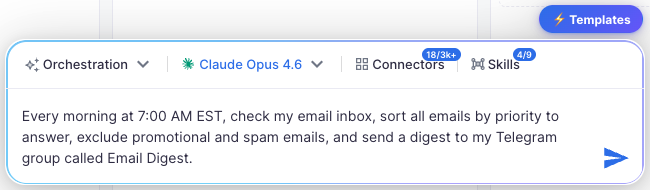
Use the Orchestrator to create an automated task. Describe what you want in plain language, for example:
“Every morning at 7:00 AM EST, check my email inbox, sort all emails by priority to answer, exclude promotional and spam emails, and send a digest to my Telegram group called Email Digest.”
Once the task is created, navigate to it and click the “Run Now” button to verify everything works as expected. Check your Telegram group to confirm the digest arrived.
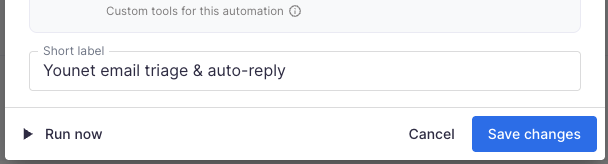
From this point forward, your AI agent will run this task automatically at the scheduled time — every single day, without any further input.
Step 9: Bonus — Reply Directly from Telegram
Want to take it a step further? Create a second automated task that watches for your replies in the Telegram group. When you respond to a digest item directly in the group chat, the agent can draft and send an email reply on your behalf.
This effectively turns your Telegram group into a lightweight, AI-powered email client — where you only see what matters and can act on it instantly.
Why This Matters
This is not about replacing email. It is about reclaiming attention.
Instead of opening your inbox 15 times a day and losing focus each time, you check one Telegram group once in the morning. The AI agent has already done the work — scanned, sorted, filtered, and delivered.
You respond to what matters. Everything else stays out of your way.
This is what agentic AI looks like in practice — not science fiction, not a chatbot answering FAQs. A digital worker that understands your priorities, connects to your tools, and executes tasks autonomously on a schedule you define.
Summary
| Step | Action |
|---|---|
| 1 | Create or select an AI agent on Younet |
| 2 | Activate the Telegram Bot (or WhatsApp) connector |
| 3 | Create a Telegram group for your digest |
| 4 | Add the bot to the group |
| 5 | Activate Gmail, Outlook, or SMTP connector |
| 6 | Test manually in Playground |
| 7 | Review results and refine instructions |
| 8 | Automate via TasksCloud with your preferred schedule |
| 9 | Optionally set up reply-from-Telegram automation |
Getting Started
To set this up, visit younet.ai and navigate to your agent's Connectors page. The entire process takes under 15 minutes and requires no technical expertise.