What's New in Younet AI v9.6: Custom MCP Servers, 3,000+ Integrations & Next-Gen Models
The way businesses connect AI agents to their tools has just changed forever. With Younet AI v9.6, you can now bring your own MCP servers, access over 8,000 app integrations with one click, and power your agents with the latest models from Anthropic, OpenAI, and Google.
Whether you are building your first AI agent or scaling an entire agentic workforce, this release removes the technical barriers that used to require expensive developers and months of integration work.
In this guide, we will walk you through everything new in v9.6 and show you exactly how to use these features.
What's in This Release?
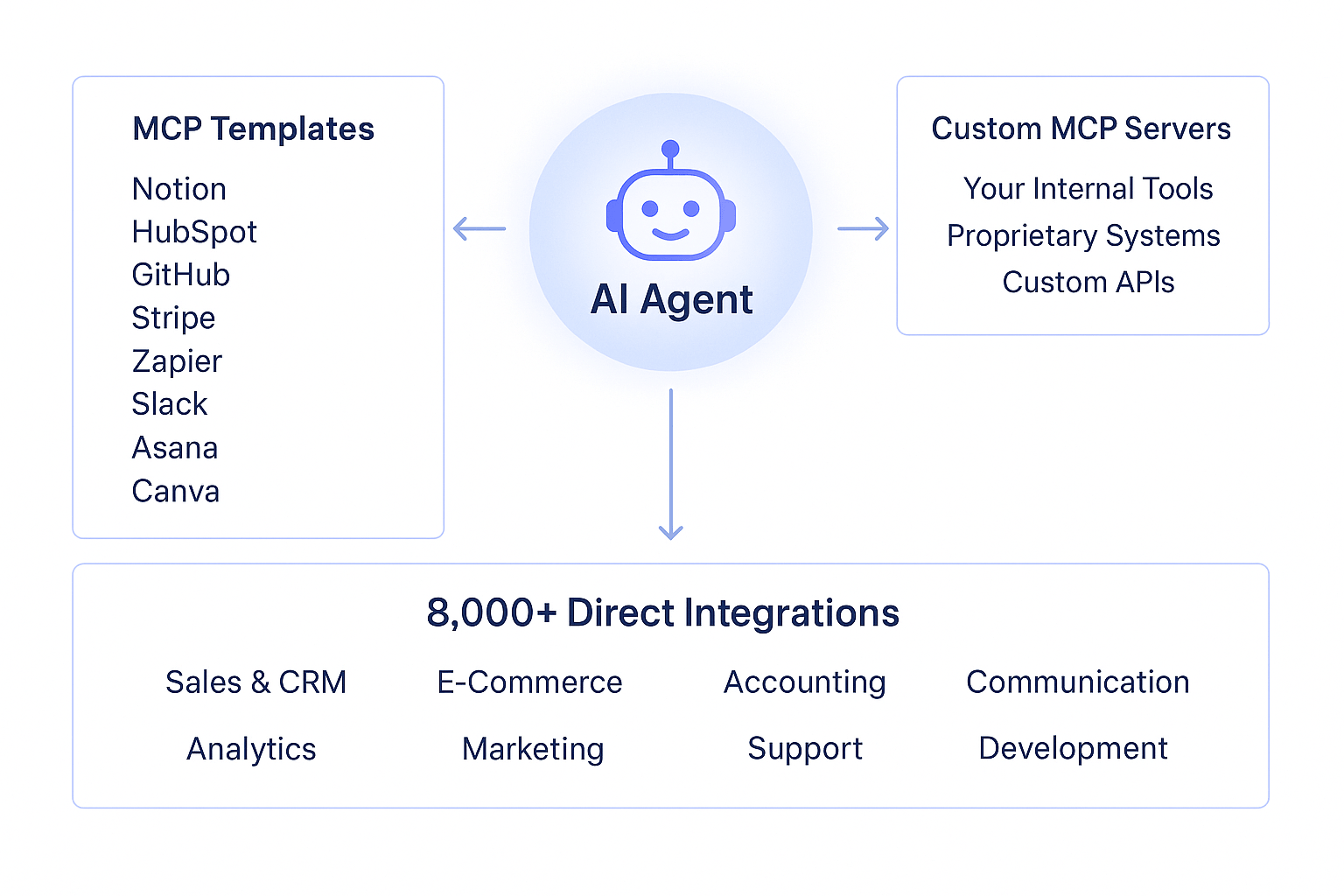
- Custom MCP Servers: Connect your own Model Context Protocol (MCP) servers to extend agent capabilities, enable custom workflows, and integrate specialized tools directly into your AI environment.
- 8,000+ Integrations: Access one-click integrations with thousands of applications across Sales, Marketing, Finance, HR, Operations, and more, making it easier to automate workflows and unify business processes.
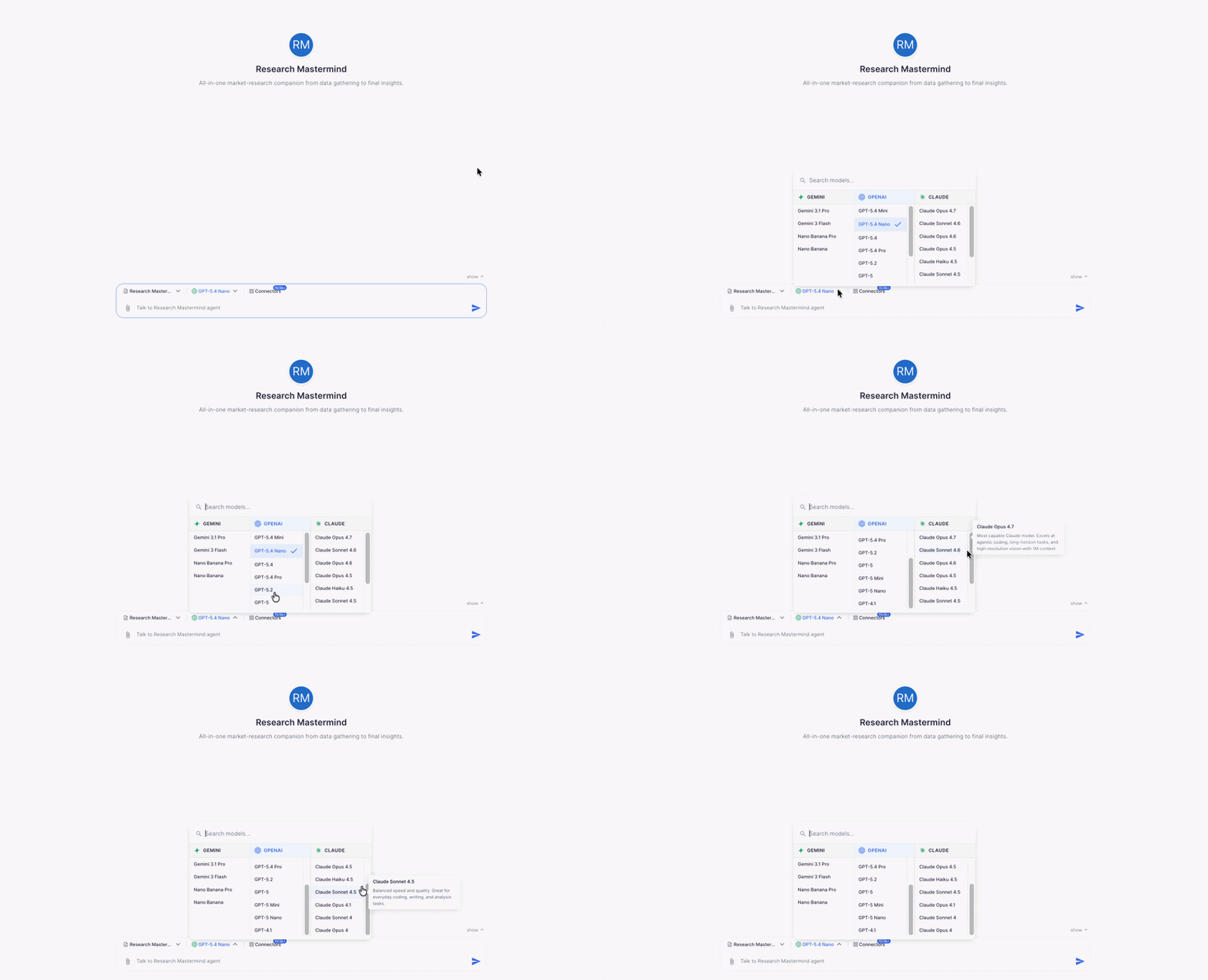
- Latest AI Models: Gain access to the newest generation of AI models, including Claude Opus 4.7, GPT-5.4, and Gemini 3.1 Pro, delivering stronger reasoning, better context handling, and improved response quality.
- Performance Upgrades: Experience faster streaming responses, a new stop button for better interaction control, and overall stability improvements for a smoother and more reliable user experience.
1: Connect Custom MCP Servers (Beta)
The Model Context Protocol (MCP) is the new standard for connecting AI agents to external tools and services. With v9.6, you can now bring your own MCP servers into Younet, dramatically expanding what your agents can accomplish.
Why This Matters: Previously, you were limited to Younet's built-in connectors. Now, if you have a custom internal tool, a niche platform, or a proprietary system, you can expose it to your AI agents through MCP.
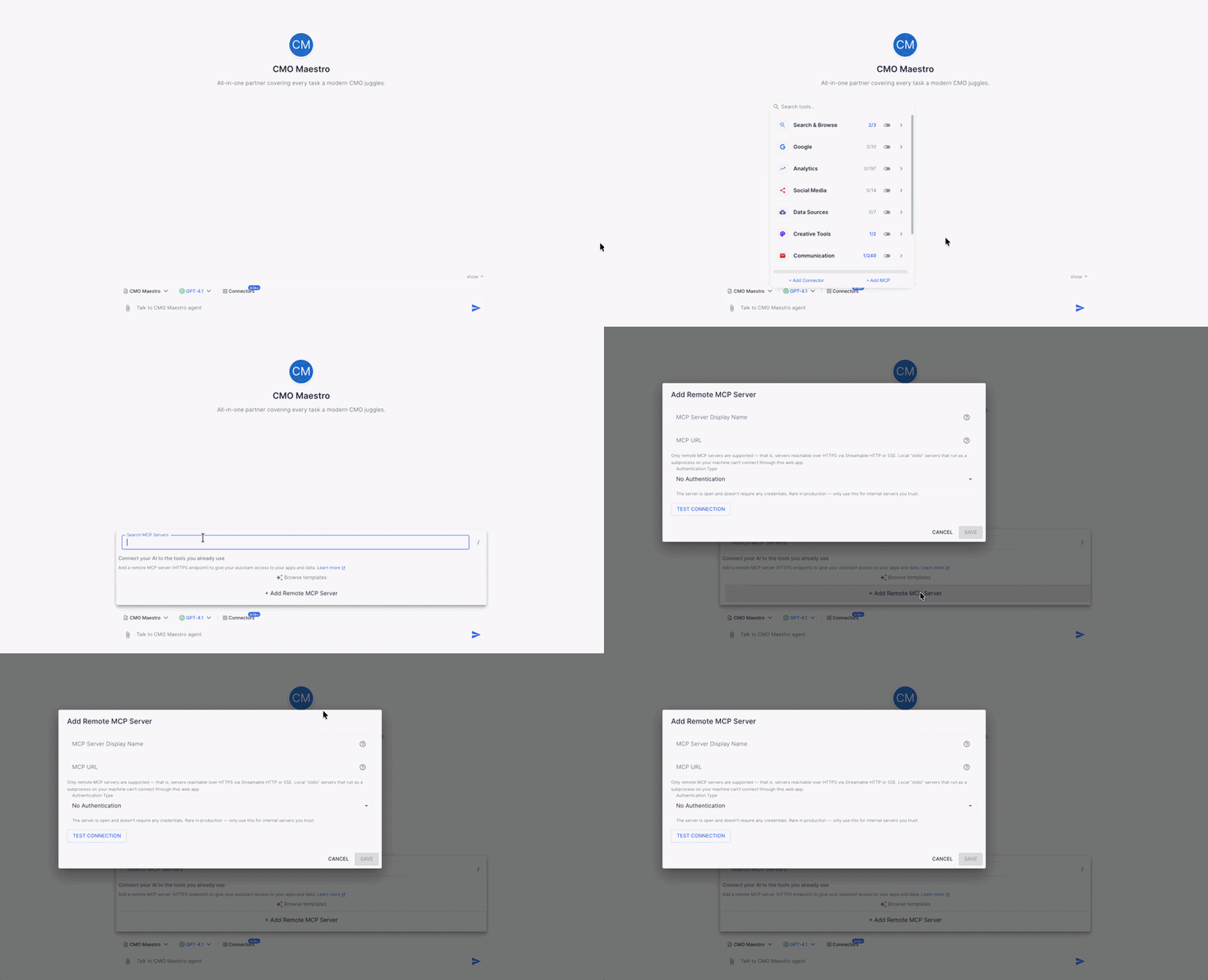
How to Add an MCP Server
- Open any agent's chat interface
- Click the arrow button in the chat input field
- Select "Connected Apps"
- Click "Add MCP Server"
- Choose from our template gallery OR paste your custom remote server URL
- Authenticate if required (OAuth 2.1 or Bearer token)
- Preview available tools before activating
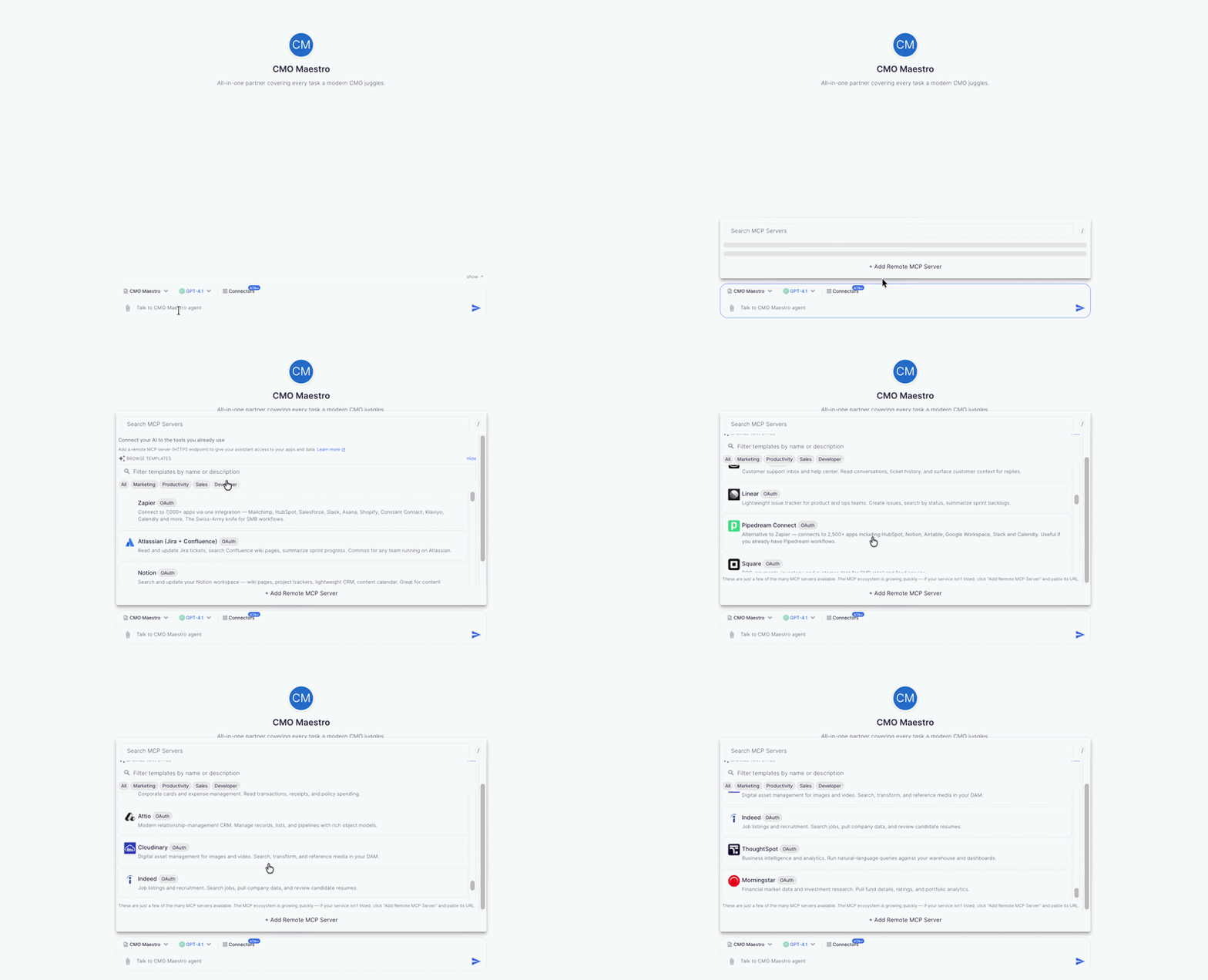
Pre-Built MCP Templates Available
We have curated a gallery of popular MCP server templates so you can connect instantly without any setup:
- Productivity: Notion, Asana, monday.com, Linear, Todoist
- CRM & Sales: HubSpot, Pipedrive, Intercom
- Development: GitHub, GitLab, Cloudflare Workers
- Payments: Stripe, PayPal, Square
- Marketing: Canva, Mailchimp, Buffer
- Automation: Zapier, n8n, Make
Pro Tip: Before activating any MCP server, use the new Live Capabilities Preview to see exactly which tools and resources the server exposes. This helps you understand what your agent will be able to do.
Access 3,000+ App Integrations Instantly
Through our expanded Pipedream partnership, your AI agents can now connect to over 3,000 third-party applications—all with modern OAuth 2.1 authentication that requires no developer setup.
How to Browse and Connect Integrations
- Navigate to the Integrations Marketplace in your dashboard
- Browse by category or search by app name
- Click "Connect" on any integration
- Complete the OAuth sign-in popup
- The integration is now available to ALL agents in your workspace
Integration Categories
| Sales & CRM | Salesforce, HubSpot, Pipedrive, Zoho CRM, Close |
| E-Commerce | Shopify, WooCommerce, BigCommerce, Amazon SP-API |
| Accounting | QuickBooks, Xero, Stripe, Chargebee, FreshBooks |
| Communication | Gmail, Slack, Discord, Telegram, Microsoft Teams |
| Analytics | Google Analytics, Mixpanel, Amplitude, Snowflake |
| Marketing | Mailchimp, ActiveCampaign, Klaviyo, Meta Ads |
| Support | Zendesk, Intercom, Freshdesk, Help Scout |
| Project Management | Asana, monday.com, Notion, ClickUp, Trello |
Key Improvement: Connect an account once, and every agent in your workspace can use it. No more connecting the same tool multiple times for different agents.
Power Your Agents with the Latest AI Models
We have added the most advanced AI models available in 2026. Each model has unique strengths, so you can choose the right brain for each agent's job.
New Models Available
| Model | Provider | Best For |
| Claude Opus 4.7 | Anthropic | Complex agentic coding, long-horizon autonomous tasks, deep analysis |
| Claude Sonnet 4.6 | Anthropic | Near-Opus performance at lower cost, great for most business tasks |
| GPT-5.4 | OpenAI | State-of-the-art coding, creative writing, general excellence |
| GPT-5.4 Pro | OpenAI | Maximum capability for enterprise-critical tasks |
| GPT-5.4 Mini | OpenAI | Fast responses, cost-efficient for high-volume workflows |
| GPT-5.4 Nano | OpenAI | Ultra-fast, lowest cost for simple tasks |
| Gemini 3.1 Pro | Advanced reasoning, multimodal understanding |
How to Choose the Right Model
- For autonomous agents that run complex multi-step workflows: Claude Opus 4.7 or GPT-5.4 Pro
- For customer-facing agents that need fast responses: GPT-5.4 Mini or Nano
- For balanced performance and cost: Claude Sonnet 4.6 or GPT-5.4
- For data analysis and reasoning tasks: Gemini 3.1 Pro
Important: All models now work identically with tools, connectors, and web search. Your agents will behave consistently regardless of which model powers them.
4: Performance & Quality Improvements
We have made significant upgrades to make your agents faster and more reliable.
Stop Button
You can now halt any AI response mid-stream with a single click. This is useful when:
- The agent is heading in the wrong direction
- You have the information you need before the response finishes
- You want to try a different prompt
Billing Note: When you stop a response, you are only charged for the tokens that were actually generated—not the full response.
Faster Streaming
We eliminated the 6-10 second lag that used to occur at the end of long responses. Now, when your agent finishes generating, the response appears complete instantly.
Heavy Load Stability
Our backend has been completely reworked to handle peak usage without slowdowns. Even when thousands of users are chatting simultaneously, your agents will respond at full speed.
Public Agent Discovery
Visitors can now preview your public agents without signing up first. This makes it easier to share your AI agents with potential customers, partners, or the public.
5: Bug Fixes & Improvements
- Fixed typing lag in long conversations with multiple tool calls ✅
- Fixed PDF processing failures on certain file types ✅
- Fixed upload issues with large DOCX files ✅
- Fixed Gemini model compatibility issues with some tools ✅
- Restored reasoning steps visibility for Claude Opus 4.7 ✅
- Restored reasoning steps visibility for Gemini 3.1 ✅
- Fixed connector access issues for shared and public agents ✅
- Improved consistency of tool behavior across different AI models ✅
Real-World Use Case: The Upgraded Customer Success Agent
Here is how you can combine these new v9.6 features to build a powerful autonomous workflow:
The Goal: Create an AI agent that handles customer inquiries, checks order status, generates invoices, and escalates complex issues, all without human intervention.
Features Used: Custom MCP Server (internal inventory system), Shopify integration, QuickBooks integration, Slack integration, Claude Opus 4.7.
The Workflow:
- Customer emails asking about their order status and requests an invoice
- Agent (powered by Claude Opus 4.7) reads the email and identifies the request
- Agent queries Shopify to get real-time shipping status
- Agent connects to your internal inventory system via custom MCP server to check stock levels
- Agent generates a PDF invoice through QuickBooks
- Agent replies to the customer with shipping status and invoice attached
- If the order is delayed, agent automatically notifies your team via Slack and offers the customer a discount code
Result: What used to require 15-20 minutes of human work now happens in under 30 seconds, 24/7.
Getting Started with v9.6
Ready to use these new features? Here is your quick-start checklist:
- Explore the Integrations Marketplace: Browse 3,000+ apps and connect your essential tools
- Try a pre-built MCP template: Start with Notion, HubSpot, or GitHub to see MCP in action
- Upgrade your agent's model: Switch to Claude Opus 4.7 or GPT-5.4 for better performance
- Test the stop button: Try it on a long response to see how it works
- Share a public agent: See how visitors can now preview without signing up
Need Help?
If you have questions about any v9.6 features, we are here to help:
- Email: support@younet.ai
- Support Center: support.younet.ai
- Related Guides:
- How to Integrate Third-Party APIs into an AI Agent
- How to Connect AI Agent to Other Platforms via MCP
- Building an Agentic Business with Younet AI
Start building with v9.6 today at www.younet.ai